GovCon Competitor Research: How to Use SBS, LinkedIn, and AI to Out-Position Your Competitors
Successful GovCon companies know exactly who else is chasing the same contracts, task orders, and GSA buys—and how those competitors show up across the federal marketing ecosystem. Followers don’t win government contracts; clearly positioned, differentiated companies do. Your job is to look sharper and more relevant than everyone on that list, everywhere your buyers find you.
Quick answer
To use LinkedIn for competitor research in GovCon, first define your real competitors with SBS data by NAICS and download the list. Then use AI to review each competitor’s capability narrative, capability statement, website, SAM profile, owner’s LinkedIn, company page, and employee activity. Log their differentiators and keywords, then update your full GovCon Marketing Ecosystem so you out-write, out-rank, and out-human them.
Author: Cecilia McDonnell | GovCon Visibility and Content Strategist
Cecilia McDonnell has spent years doing competitor research and strategic marketing to help small government contractors - including 8(a), WOSB, and HUBZone firms - build the LinkedIn presence and positioning they need to get found by federal buyers and prime contractors. She is the creator of the PRE Framework for GovCon LinkedIn visibility and the GovCon Marketing Ecosystem Blueprint. Currently serves as GovCon Visibility and Content Strategist at GovCon Chamber.
Connect on LinkedIn | Questions? Email Cecilia directly
Last reviewed: April 2026

How to Find GovCon Competitors Using SBA Small Business Search (SBS)
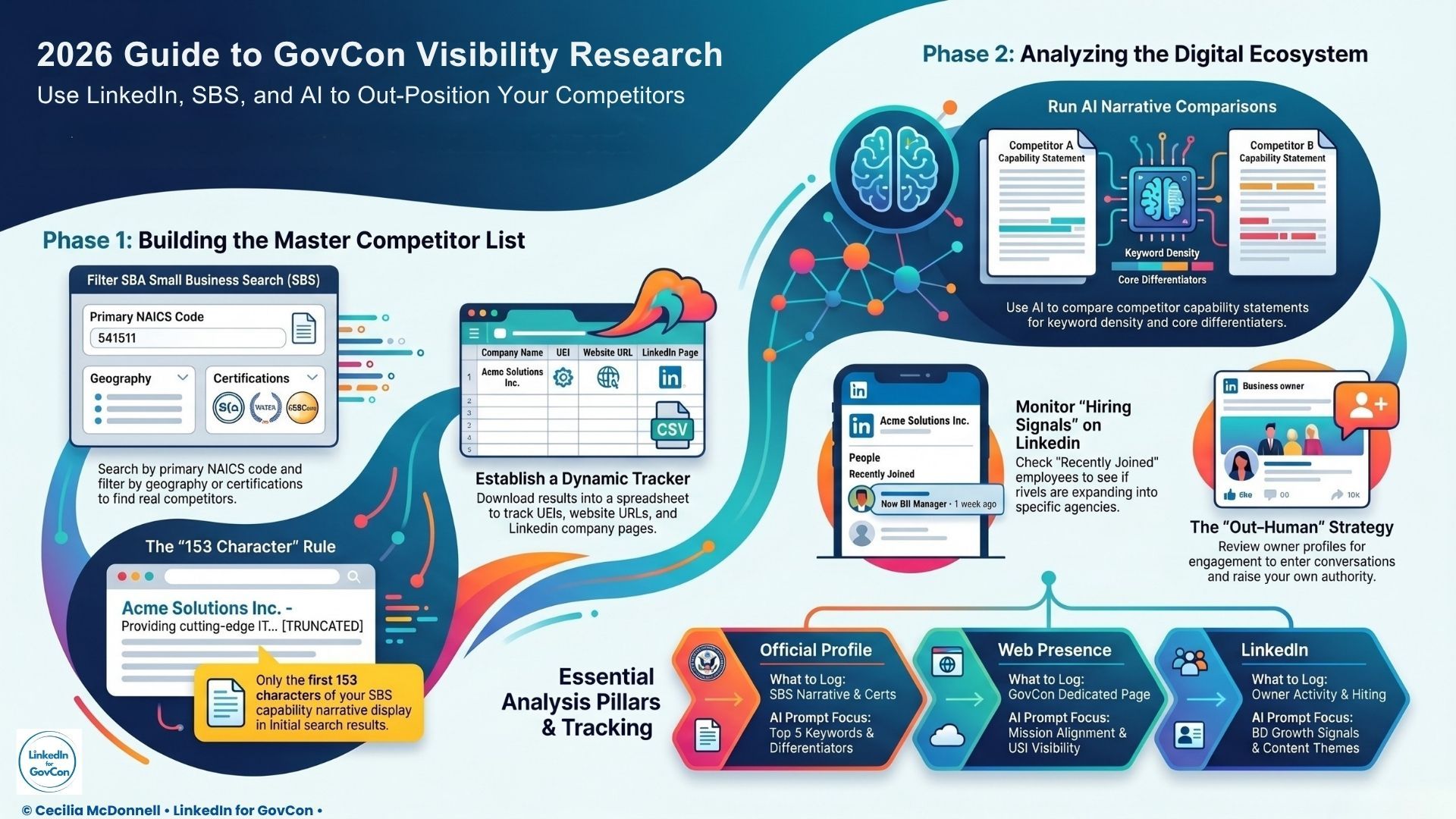
The Small Business Search (SBS) is the most comprehensive official list of small businesses registered to pursue federal contracts. This database will help you define exactly who actually competes with you for federal contracts in your niche and NAICS codes.
- First, review your own profile in SBA’s Small Business Search. If it is incomplete or missing key information, update it as soon as possible as this is what buyers use for market research.
- Next, use your primary NAICS code to search for all companies in your space.
- Refine the results by filtering by geography, certifications ie 8(a) / HUBZone/WOSB, or agency focus
- Download all results into a spreadsheet. This is your master list of real competitors, not guesses and anecdotes.
- Clean up the data columns to only show key relevant data, including company name, UEI, NAICS, certifications, website URL.
- Hide any immediately unnecessary columns like ownership, emails and dates.
- Add a column for LinkedIn company page URL (you’ll fill this in later).
Name your document clearly, ie "NAICS-541512 -Computer Systems Design Services 2026 Competitors" . Now you have a concrete, working list you can sort, update, and return to every quarter.
Original finding: Case Study Aerapy UV
In a 2026 competitor analysis for Annette Uda, president of Aerapy UV (Illinois), LinkedIn for GovCon identified the firm as the sole 8(a)-certified UV disinfection provider in NAICS 333413 - a positioning advantage that directly shaped their SBS narrative, outreach and LinkedIn strategy.
“In federal contracting, competitor research is not a ‘nice to have’—it’s market due diligence. Contractors who don’t systematically study rival awards, pricing, and past performance are bidding blind.” California Veteran DVBE Strategies
Analyze Competitor Capability Narratives and Statements
Capability Narratives: How Companies Pitch Government Buyers
The SBS functions as a marketing tool as well as a qualified database. Each SBS profile includes a capability narrative at the top. Only the first 153 characters typically display in the search results. This essential description is designed to tell buyers exactly what they do and who they serve—in their own words.
It should be rich in AI searchable and buyer filter keywords. It should also be consistent with how they describe their services on their Capability Statement and website.
🎯 Upload your spreadsheet to your AI tool. Prompt a review of your competitors and generate a complete comparison of only the capability narratives.
- Review each competitor according to narrative visibility and strength; top differentiators, top five keywords.
- Include your own company in the AI review to see exactly how you compare.
Additional observations about style and tone.
- What do they lead with—outcomes, tech, team, certifications, past performance?
- Are they speaking to a federal buyer, or does it read like a generic “about us”?
- Which agencies, missions, or contract vehicles do they actually name?
- Which differentiators overlap with yours?
- What buyer-language keywords keep repeating?
Capability Statements: differentiators and keywords
Review the capability statements of your qualified competitors. Collect links to your capability statements.
🎯 Upload these links to your AI tool. Prompt a review of your competitors and generate a complete comparison.
Review for consistency and standards.
- Is it clear, compelling and concise?
- Will it hook a buyer long enough to get a introductory meeting?
Read it for differentiators, past performance examples, and keyword choices.
- Are there phrases you should adopt, outperform, or avoid?
- Do you use consistent language across your own capability statement and every other asset?
How to Use Competitor Websites for GovCon Market Research
Typically, a contracting officer will go to a company website after reviewing a company's basic SBS profile and capability statement.
You can do this with AI or yourself. Your AI tool will deliver the data but not visual human design impressions. Always review the sites of your competitors personally to understand and to get ideas.
🎯 PROMPT your AI to review each primary competitor website and generate a complete comparison.
- Is it obvious what they do, who they serve, and why anyone should care?
- Can a federal buyer see themselves and their mission in the first screen?
- Do you see real proof—agencies, contracts, outcomes—or vague marketing language?
- Does the website include UEI and contact information in the footer or header?
Dedicated government contracting page
Contracting officers are just verifying the legitimacy of your company when they visit a vendor website.
They will look for a dedicated government contracting page.
A mature company will have easily accessible contracting and contact details and a capability statement download. The UEI should display in header or footer be hyperlinked to your SBS profile.
LinkedIn Profile Analysis for GovCon Competitor Research
GovCon is heavily relationship-driven. The owner is often the face of the company and may use LinkedIn for strategic positioning and thought leadership.
🎯 PROMPT your AI tool to review each primary competitor personal profile and generate a complete comparison.
Now that you have a refined competitor list, you want to see how the company owners appear on LinkedIn. You can research companies by name, keyword or employee connections.
Find the CEO and any other key leadership. Upload their profiles to your AI tool for analysis. AI can do the basic profile analysis ie headline, About section, network size, skills and keywords.
However, content is not completely visible off platform, so you will have to do this yourself. Review their posting activity and frequency. Look for who engages with their content. Is their profile active or passive?
🎯 PROMPT your AI tool to review each primary competitor personal profile to yours.
What are they posting about? Does it align with the PRE Framework method?
- Does their content clarify their niche and speak to your target audience?
- Do their posts reinforce their reputation?
- Are they actively commenting, engaging and building their network?
- Can you enter those conversations to raise your own visibility and credibility?
Company LinkedIn pages
Compare company LinkedIn pages to their other assets in the GovCon Marketing Ecosystem.
Page positioning: tagline, About, specialties
Look at the tagline, About section, and specialties first.
- Do they clearly state who they serve and what they do in the federal space?
- Do they mention agencies, missions, or contract vehicles?
- Are the specialties aligned with the phrases buyers and primes actually type into LinkedIn search, or are they vague and generic?
- Check whether this story matches what you saw on SBS and the website, or whether it feels fragmented.
Content: frequency, formats, topics, engagement
Scan their content feed. Note posting frequency, format variety, topic patterns, engagement quality.
- Do they have publicly-accessible anchor articles that reinforce their authority?
- Are they post consistent and timely content, or posting sporadically?
- Are buyers and primes engaging in the comments, or is it just likes?
- Are there topics you could use to outperform them?
Research: Employee profiles
Employee profiles reveal where a company is investing, often before the contracts hit the public databases.
On the LinkedIn “People” tab, check headcount trend, mix of roles, and the quality of senior profiles. Then sort by “Recently joined” to see who they’re adding and in what functions—BD, capture, proposal, cleared technical roles, PM. Review their open roles on LinkedIn Jobs for the skills, clearances, and agencies they name.
Log these as strategy signals in your tracker. A wave of BD hires in a specific agency vertical, new cleared engineers in a niche technology, or a dedicated proposal manager tell you where they intend to grow. Use that insight to decide whether to match, avoid, or differentiate your own focus.
LinkedIn Keyword Research for GovCon Competitive Positioning
LinkedIn Critical Search
On LinkedIn, search the exact terms your buyers use—phrases like “HUBZone IT services,” “CMMC compliance support,” “cleared program management,” or whatever fits your niche.
Note which company pages and profiles appear at the top, and check where those keywords live in their profiles: headlines, About sections, experience entries, specialties. Compare that with your own assets and adjust your language so your core buyer terms are prominent, not buried.
AI Visibility Verification
Run the same process through AI tools by searching competitor names, category plus region, and your own company. See how competitors are described, what proof points show up, and whether you appear at all.
If AI can describe your competitors clearly but struggles with you, you don’t have enough consistent, indexed content telling a strong, aligned story.
How Competitor Research Strengthens Your GovCon Marketing Ecosystem
For each competitor (and for yourself), keep tracking –
- SBS narrative strength and keywords
- capability statement differentiators
- NAICS/PSC/certifications
- website clarity and GovCon readiness,
- owner profile strength
- company page positioning and content themes
- employee and hiring signals
- LinkedIn keyword presence, and AI visibility with the summary keywords used.
Review and update quarterly. Use this intelligence to update your full GovCon marketing ecosystem: your SBS narrative, SAM profile, capability statement, website, owner and company LinkedIn profiles, and the topics you show up for consistently.
Focus on four moves—out-writing their positioning, out-ranking them on buyer language, owning the topics they ignore, and out-humaning them with visible, credible people.
FAQs
What is competitor analysis in government contracting?
Competitor analysis in government contracting is the structured process of tracking who is winning the work you want, how they are pricing and positioning, and where they are vulnerable so you can shape a stronger bid strategy. It pulls data from federal award databases, agency buying patterns, and past performance records to benchmark your offerings and refine where you compete.
How can I use SAM.gov to research my competitors?
You can use SAM.gov to see which companies are winning specific opportunities, identify incumbent contractors, and track upcoming recompetes in your core NAICS and set-aside categories. By reviewing awarded and inactive opportunities, pulling UEI numbers, and saving searches, you can map a competitor list, see what agencies they serve, and forecast future deals they are likely to defend.
How can I use competitor intelligence to identify teaming and subcontracting opportunities?
Competitor intelligence helps you spot primes that consistently win in your space but lack specific capabilities, certifications, or geographic coverage you provide, making them natural teaming targets. By analyzing award histories and existing teaming patterns, you can approach partners who already win with your target agencies and position yourself as the missing capability they need to strengthen future bids.
What are the best free competitor analysis tools for federal contractors right now?
The strongest foundation is a mix of free federal sources—SAM.gov, FPDS, USAspending, GSA eLibrary/SSQ+—combined with at least one GovCon-specific intelligence platform. Contractors often pair these with market intelligence or AI platforms that sit on top of government data to automate award tracking, reveal competitor teaming patterns, and flag high-fit opportunities before they hit recompete.
Published by LinkedIn for GovCon
- Editorial policy: All content reviewed by Cecilia McDonnell
- AI assistance disclosure: "AI is used to assist drafting and research, with human editorial review by Cecilia McDonnell"
- Fact-checking: Sources cited directly to origin
Last reviewed: April 2026